

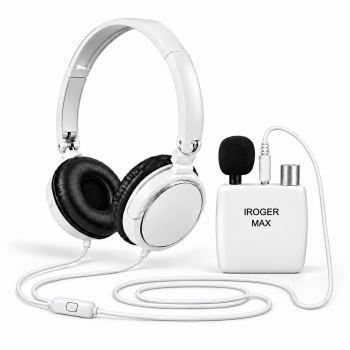
IROGER MAX Hearing Amplifier
$189.00
Choose MAX for compatible Bluetooth calls and media, selectable EQ, or remote microphone and TV audio with optional TX. Includes headband headphones; TX is sold separately.
View product detailsCompare hearing amplifiers for seniors and older adults for TV listening, one-on-one conversations and everyday talks with family. Choose by the controls you prefer, headphone fit and the sound source. IR8 includes headband headphones; I8-Pro includes both headband headphones and in-ear earphones. MAX adds compatible Bluetooth audio, EQ and optional TX connections.
All three personal sound amplifiers have a specified maximum gain of 65 dB. The main buying differences are the included listening accessories, connection options, and controls—not a higher gain number.
Keep the controls with you and move the microphone toward the sound. IR8 and I8-Pro include a 3 m microphone extension cable for wired placement near a speaker or television. MAX can receive a remote audio source wirelessly when paired with optional TX; headphones still connect to MAX by cable.
$189.00
Choose MAX for compatible Bluetooth calls and media, selectable EQ, or remote microphone and TV audio with optional TX. Includes headband headphones; TX is sold separately.
View product details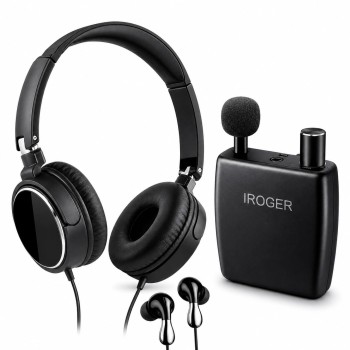
$99.00
Choose I8-Pro when you want both headband headphones and in-ear earphones included. Shares IR8's one-knob operation, 65 dB specified maximum gain, and up to 120-hour runtime.
View product details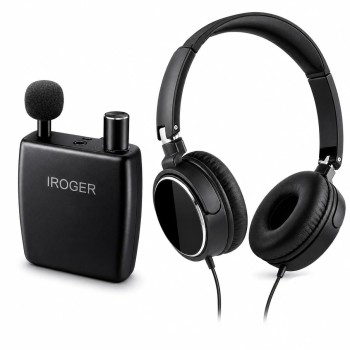
$99.00
Choose IR8 for a wired listening package centered on headband headphones. Includes a separate directional microphone and 3 m extension cable, with one-knob power and volume.
View product detailsSimple controls for seniors and family setup: IR8 and I8-Pro combine power and volume in one knob. Choose IR8 for included headband headphones, or I8-Pro to try both included headphones and in-ear earphones.
TV listening and conversations at a distance: use the included 3 m microphone extension cable with IR8 or I8-Pro to place the microphone near the person speaking or TV speaker while keeping the controls beside you. Read our microphone and TV listening guide.
Your preferred headphone fit: the standard 3.5 mm listening connection lets you choose compatible wired headphones or earbuds. Check plug compatibility and included accessories on the product page.
Wireless microphone or TV audio: choose MAX with optional TX to send a microphone or compatible analog TV output over 2.4 GHz. TX accepts a compatible cable from RCA AUDIO OUT or 3.5 mm HEADPHONE OUT; headphones still connect to MAX by cable. Check your TV output before ordering.
IR8 and I8-Pro share one-knob power and volume, automatic gain control, and up to 120 hours of use per charge. Choose between their included listening accessories; choose MAX for additional audio connections and EQ.
On a small screen, swipe the table horizontally to see all three models.
| Compare | IR8 | I8-Pro | IROGER MAX |
|---|---|---|---|
| Choose when | You want a wired setup with headband headphones | You want both headband and in-ear listening styles in the box | You need Bluetooth audio, EQ choices, or an optional remote TX connection |
| Listening kit | Headband headphones, directional microphone, and 3 m microphone extension cable | Headband headphones, in-ear earphones, directional microphone, and 3 m microphone extension cable | Headband headphones and external microphone; TX sold separately |
| Daily controls | One knob for power and volume; automatic gain control | One knob for power and volume; automatic gain control | On-device volume and selectable EQ profiles |
| Max. gain | 65 dB | 65 dB | 65 dB in hearing-amplifier mode |
| Stated runtime | Up to 120 hours per charge | Up to 120 hours per charge | Up to 150 hours in amplifier mode; up to 50 hours in wireless mode |
| Audio sources | Wired microphone listening; no Bluetooth or TX pairing | Wired microphone listening; no Bluetooth or TX pairing | Compatible Bluetooth calls and media without TX; optional TX sends microphone or TV audio over 2.4 GHz |
| Headphones | Compatible wired 3.5 mm headphones or earphones | Compatible wired 3.5 mm headphones or earphones | Compatible wired headphones or earphones, including when receiving Bluetooth or TX audio |
Runtime depends on mode, volume, connected headphones, and use conditions. Start with the volume low and increase it gradually to a comfortable level. See each product page for the full package and specifications.
Choose the included listening style first, then decide whether you need MAX's Bluetooth and optional TX features. Current model prices are shown below; TX is a separate accessory.
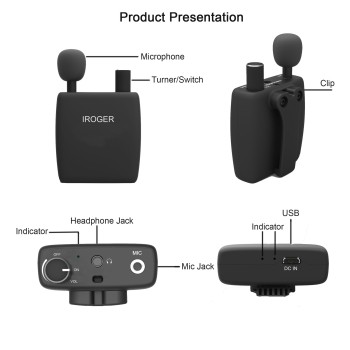
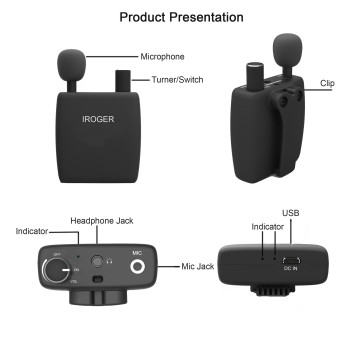
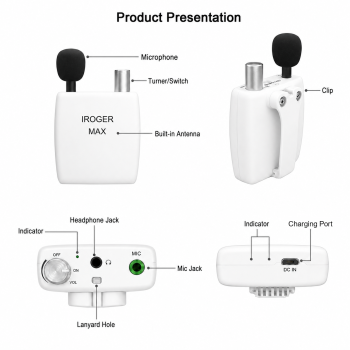
Start with the sound source and how far away it is. A wireless source connection is useful in some setups, but you do not need TX for every listening task.
Choose IR8 for a headband-headphone package, or I8-Pro to try both headband headphones and in-ear earphones. For a one-on-one talk, place the directional microphone near the person speaking and keep the volume control beside you. Both models include one-knob controls and a 3 m microphone extension cable; no phone pairing is needed.
IR8 or I8-Pro can pick up the TV's speakers through the included microphone. Use the included 3 m extension cable to place it nearer the television while the controls stay with you. This uses the microphone rather than the TV's audio output. Read our hearing amplifier guide for TV and conversations for placement and listening adjustments.
Choose MAX for Bluetooth audio and selectable EQ. Connect wired headphones to MAX and pair it with a compatible phone or media source. TX is not required for this Bluetooth connection; call support depends on the source device and settings.
Choose MAX plus an optional IROGER TX. Connect a microphone near the speaker, or a compatible TV's analog RCA AUDIO OUT or 3.5 mm HEADPHONE OUT, to TX. TX sends that source to MAX over its dedicated 2.4 GHz link, with deep environmental noise reduction on the connected TX audio path.
MAX works with its connected microphone or compatible Bluetooth audio without TX. Add TX only for a remote microphone or compatible wired TV/audio source. TX is not Bluetooth, has no headphone output, and does not pair with IR8 or I8-Pro.
MAX + one TX product subtotal: MAX $189.00 + TX $79.00 = $268.00. These are two separately sold products, not a discounted bundle. Final tax and shipping are confirmed at checkout.
TX includes the transmitter, charging cable, and manual—not a microphone or TV audio cable. MAX includes an external microphone. Check your source's output and the MAX and TX manuals for the appropriate connection cable before ordering; an optical- or HDMI-only TV is not a direct analog AUX connection.
Many OTC hearing aids keep the microphone, controls, and earpiece together at the ear. iRoger IR8 and I8-Pro use a pocket amplifier with a separate directional microphone. With a compatible extension cable, the microphone can be placed nearer the sound source, helping the wanted sound reach the microphone more directly before amplification. The standard 3.5 mm connection also lets you choose compatible headphones or earbuds instead of being limited to one earpiece style.
Read the practical design comparisonReview operating instructions, care information, warranty details, and contact options from the pages below.
No. Both specify up to 65 dB maximum gain, automatic gain control, one-knob operation, and up to 120 hours of runtime. I8-Pro adds in-ear earphones to the headband-headphone package. Choose it for the included wearing options, not an assumed gain increase.
Choose MAX for compatible Bluetooth calls and media, selectable EQ, or remote audio through optional TX. All three specify up to 65 dB maximum hearing-amplifier gain; the upgrade is connection and control flexibility, not a higher gain specification.
No. MAX can use its connected microphone and receive compatible Bluetooth audio without TX. TX is a separately sold accessory for sending a remote microphone or compatible wired TV/audio source to MAX.
No. Bluetooth and TX describe the audio connection into MAX. Headphones or earphones connect to MAX by cable, including during wireless-source listening. For MAX hands-free phone calls and headset mode control, use a 4-pole 3.5 mm (TRRS) headset with its own MAX-compatible inline controller and microphone. A 3.5 mm listening plug alone does not provide those functions.
No. The stated maximum is up to 150 hours in amplifier mode and up to 50 hours in wireless mode. Actual runtime varies with mode, volume, headphones, and use conditions.
Start with the controls and wearing style the listener can comfortably use. IR8 hearing amplifier and I8-Pro hearing amplifier use one knob for power and volume, with no phone pairing needed for microphone listening. IR8 includes headband headphones; I8-Pro includes both headband headphones and in-ear earphones. MAX adds buttons, selectable EQ and Bluetooth or optional TX connections. Try the fit and a simple setup together; our hearing amplifiers for seniors guide explains what to compare.
Yes. Connect the microphone and headphones, start with the listening volume low, and point the directional microphone toward the person speaking. Place it closer to their voice while keeping it clear of rubbing clothing and nearby noise. IR8 and I8-Pro include a 3 m microphone extension cable so the amplifier can stay beside the listener. Adjust placement first, then raise volume gradually to a comfortable level. See the conversation microphone placement guide for setup and troubleshooting.
For a wired TV audio source, use MAX with optional IROGER TX wireless audio transmitter. Connect the TV's 3.5 mm HEADPHONE OUT to TX AUX with a compatible 3.5 mm audio cable, or use an RCA-to-3.5 mm cable from analog RCA AUDIO OUT. Select the TV output and connect TX to MAX according to the manuals. TX sends audio over dedicated 2.4 GHz wireless; headphones still connect to MAX by cable. TX and TV audio cables are separate purchases. Read the MAX TV connection steps.
The IR0211 replacement microphone is compatible with IR8, I8-Pro, MAX and TX. Connect it to the device's microphone input. For a wireless conversation setup, the microphone connects to TX and the listener uses MAX as the receiver. See the microphone product page for the model-by-model compatibility table.
IR8, I8-Pro and MAX accept 3.5 mm wired headphones or earbuds for listening, including your own pair. IR3442 replacement headband headphones suit smaller heads and support listening. IR3245 replacement in-ear earbuds include an inline controller and microphone for MAX hands-free calls and mode control. White MAX replacement headphones with microphone and controller provide a headband option with those MAX functions and a 4-pole 3.5 mm (TRRS) plug. IR3442 does not include those controls or a microphone. For MAX hands-free phone calls and headset mode control, use a 4-pole 3.5 mm (TRRS) headset with its own MAX-compatible inline controller and microphone. A 3.5 mm listening plug alone does not provide those functions. TX has no headphone output. Compare headphone and earbud fit.