

How to Hear Conversations and TV More Clearly with a Hearing Amplifier
Improve conversation and TV listening with better microphone placement. Compare IR8's extension cable with MAX and TX wireless microphone or TV setups.
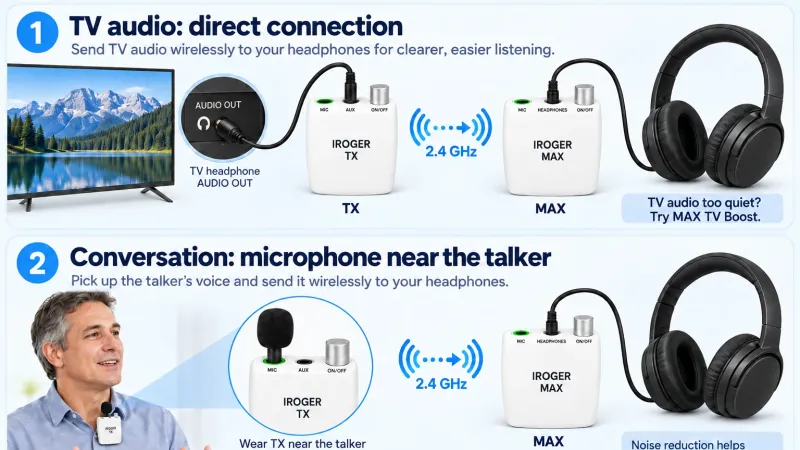
When conversation or television dialogue sounds unclear, turning everything up may make the room louder without making words easier to follow. A better starting point is the signal reaching your microphone: how close it is to the person or television, what direction it faces, and how much competing sound it collects.
For iRoger users, there are two practical approaches: move a wired microphone closer with IR8, or use MAX with an optional TX transmitter to bring conversation or television audio to the listener wirelessly.
Start with the microphone, not the volume
A microphone beside your chair hears what reaches your chair, including nearby fans, dishes, other voices, and sound reflected around the room. Moving it nearer the sound you want can give that sound an advantage before amplification begins.
A directional microphone helps emphasize sound from the direction it faces and reduce some off-axis noise. It does not remove every background sound or separate every voice. Aim it toward the person speaking, move away from competing noise where possible, and compare the result at a comfortable volume.
IR8: move the microphone, keep the controls with you
The IR8 personal sound amplifier includes a separate directional microphone and a 3 m microphone extension cable. The extension lets the microphone sit closer to a television speaker or conversation partner while IR8 remains beside you.
For TV, position the microphone near the speaker rather than beside a noisy chair or fan. Leave it unobstructed, avoid contact with vibrating surfaces, and route the cable where nobody will trip over it. For a conversation, place or aim the microphone toward the speaker rather than the center of a noisy room.
This is a straightforward choice when a wired connection fits your space. It still captures sound acoustically, so room noise and competing voices can remain audible. Try a better position before increasing the gain.

For television, send the audio directly through TX
With an IROGER TX television audio transmitter, a compatible TV can send its audio output to MAX without relying on a room microphone to pick up the TV speakers.
Audio path: TV audio output → TX AUX input → dedicated 2.4 GHz wireless connection → MAX → wired headphones or earphones.
Use the TV's analog RCA AUDIO OUT or 3.5 mm HEADPHONE OUT with an appropriate cable. Confirm that the socket is an output, not an input. If the TV only provides optical or HDMI ARC/eARC audio, check its documentation for a compatible external adapter and audio settings. TX does not contain an optical or HDMI converter.
This connection avoids room-microphone pickup in the TV feed; it does not remove music, effects, or background noise already in the program. If the TV feed is too quiet, IROGER MAX offers TV Boost for additional preamplification. If sound clips or becomes distorted, lower the TV output or return to Normal. More amplification is not automatically clearer.
TX uses its dedicated 2.4 GHz link, not Bluetooth. Headphones connect to MAX, and listening volume is adjusted there. Follow the MAX and TX setup instructions for wireless mode. Check whether using the TV's audio output changes its built-in speaker behavior.
For conversation, keep the microphone near the speaker
Connect a compatible external microphone to TX, then clip the transmitter to the speaker's collar or chest with the microphone unobstructed. Keep it clear of fabric, jewelry, and other items that could rub against it. The listener keeps MAX and the connected headphones with them.
This arrangement can be useful when a wired microphone extension would be inconvenient. However, the microphone favors the person wearing it, not everyone around a table equally. For a new speaker, change its position rather than assuming more volume will capture the whole group clearly.
The MAX kit includes an external microphone. The separate TX package does not include a microphone or a TV audio cable, so check the accessories needed for your setup before ordering.
What noise reduction can and cannot do
For the external-microphone conversation setup, TX uses multiple noise-reduction algorithms, including additional background-noise suppression during speech pauses. This is intended to make unwanted noise less intrusive; it is not a promise of silence between every sentence.
Overlapping voices, sudden sounds, and the recording itself can still affect clarity. Microphone placement and source selection remain important. With a direct TV connection, the useful difference starts with the source: TV audio enters TX electrically instead of being collected from the room. This does not soundproof the headphones; surrounding sound can still reach your ears.
Choose the setup for the situation
| Setup | Useful for | Main limit |
|---|---|---|
| IR8 + directional microphone | Bringing a microphone nearer a TV speaker or nearby talker using the included 3 m extension. | A wired setup that still picks up some room sound. |
| TX + MAX for TV | Sending compatible TV audio directly to the listener. | Requires an appropriate TV output and cable; program background sound remains. |
| TX + MAX for conversation | Keeping an external microphone close to a speaker who wears TX. | Requires MAX and a compatible microphone; does not favor every group member equally. |
Make one change at a time
Start at a low volume, check the microphone or TV connection, and increase only to a comfortable level. Change placement before comparing sound programs. If you hear whistling, consult the hearing amplifier feedback troubleshooting guide before turning the volume higher.
Choose by the connection you need, not simply the biggest feature list. The iRoger hearing amplifier comparison brings the model differences together.